Hello,
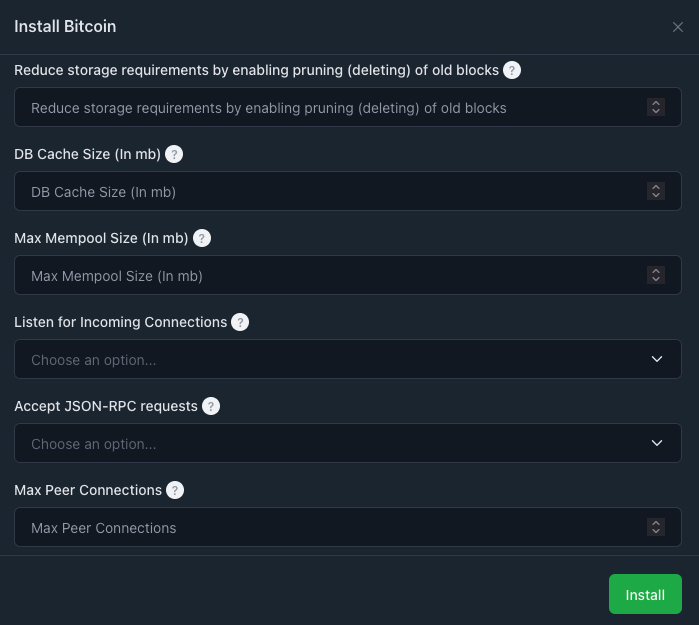
I’ve installed the Bitcoin node. I would like it to remain at 100GB, not more. Where and how do I enter this info so that it doesn’t download the entire 500GB+ node?
Thank you.
EDIT: I’ve tried entering the following in the docker-compose.yml:
EDIT 1: It has started but is downloading MORE than the 102400MiB. I sure hope someone sees this and can help me out.
EDIT 2: I have done more reading, and see that I need to create an RPC user for my BTCPayServer instance, hosted elsewhere, to connect to this Bitcoin node… but all the documentation I’ve found for this presumes I’ve set up the node by itself, and not through a hosting OS. Can anyone walk me through the steps to create this RPC user please? Seems I need to install and access something like rpcauth.py… but where and how? From within the Bitcoin container, I guess? Or is there something I can do just logging into the VPS?
Looking at the repository (found in the information tab), they give some basic command to interact with the container itself :
Note that in Runtipi case, your container name won’t just be bitcoind but will looks more like that : bitcoind_migrated-bitcoind-1*
So your commands will looks likes that docker exec -it bitcoind_migrated-bitcoind-1
I appreciate your reply. Thank you. I need to read it over several times still. Did you say I need to change the “bitcoind” under “services:” to “bitcoind_migrated-bitcoind-1”??
Also, it seems an easy way to manage this is to add a bitcoin.conf, but where in the world is that in this Runtipi setup? Most guides I’ve read say “/bitcoin/.bitcoin/bitcoin.conf”… so if I can figure out in which directory (INSIDE the running container?? outside the container???), this might be solved. But I haven’t found either a directory like “bitcoin” nor “.bitcoin”. If you can help with this, thank you!
Don’t forget to restart the app after a modification
PS: This is probably all you need especially if you are not comfortable enough with docker. I will clarify my initial explanation in another message if you want to go further later.
Make sure to read my previous message.
Keep in mind that Runtipi’s goal is to simplify things and avoid tweaking files here and there, while staying some pure Docker.
Technical details
No, these are two different things.
The correct syntax is the one I shared, where the service name is bitcoind not bitcoin_node as written in your first message.
The name bitcoind_migrated-bitcoind-1 is referring to the container name.
Which is composed this way : appname_appstorename-servicename-1(it will vary depending on your install)
This information is useful when you need to interact with the container, as referenced in my first message.
NB: With my previous indication, editing the user-configuration isn’t necessary anymore.
Docker compose configuration
To find how the path are mapped or what variable has already been set, you can check the docker-compose.yml file Runtipi is using.
From your runtipi installation directory : apps/migrated/bitcoind/docker-compose.yml
In this case we have : ${APP_DATA_DIR}/data:/root/.bitcoin
Where ${APP_DATA_DIR} equals to app-data/migrated/bitcoind
So from your runtipi installation directory, the file you are looking for should be there: app-data/migrated/bitcoind/data/bitcoin.conf
I saw that, but since I am not familiaar with the syntax, I have no idea whether to enter 1, 0, -1, 102400, <1024000, etc. Many different tuts, using different syntax haven’t helped me either.
Just to note that this info comes from the docker-compose.yml file I found while the app was running. Which only further confused me because that name, bitcoin_node, wasn’ in the user editable files in the Dashboard! “so which is it?” has always been my question about so much of this.